AI staff for trade businesses
The office keeps running while you're on the tools
Tradies Line is job management software with AI staff. They book the jobs, draft the quotes and invoices, chase what's owed and answer your calls and messages.

WomboYour AI office manager
Who owes me money?
Wombo is looking
Listening
- 10,000+ Customer calls and messages handled
- +19% Average revenue increase
- −50% Admin work
- 24/7 Calls and conversations, nights and weekends

Meet Wombo
On paid plans, Wombo answers your customers while you're on the tools and puts new work in the calendar. He also reminds the people who still owe you, and knows your prices, your hours and the suburbs you cover, so by smoko the office side is already done.
Your whole office, in one place
Run every job from one place, from the first enquiry to the paid invoice: the schedule, the crew, the quotes, the payments and every customer. The business stops living in your head and your ute, and Wombo, your AI office manager, takes the admin off your hands.


Job management and dispatch
Know where every crew is and what's next, without the 6am phone calls. Move a job with a drag, send everyone their day's run in one tap, and watch the time and photos come back from site.
Everyone sees what their role allows: the office runs the board, techs see only their own jobs, and subbies never get your customer's number.
Free has 1 login, Starter 5, and Pro and Enterprise unlimited. Subcontractors don't need one.
See job management

Quotes and estimates
Give a price while the customer's still keen. On a paid plan, callers can hear a ballpark from your own price list on the first call, the quote follows from the same list, and they say yes on their phone. Turn on follow-ups and the quiet ones get a nudge before it expires.
A yes turns straight into a job, ready to schedule. Nothing to type twice.
See quotes






Invoicing and payments
Get paid before you've packed up the ute. Send the invoice from the job, and with TradiesLine Pay on, your customer taps the link and pays by card or phone wallet, or with Afterpay or Klarna where available, and the money lands in your own account. Turn on reminders and the chasing happens without you.
No more matching bank statements. An invoice paid through TradiesLine Pay marks itself paid, and with Xero connected, a copy syncs there too and comes back paid on its own.
See invoicing and payments

Customer records (CRM)
Remember every customer like it was yesterday. Every call, message, job, quote and invoice lands on their record without anyone typing a thing, so when they ring back you already know the last job and what you charged.
Bring your old customer list as a spreadsheet. It sorts the columns out for you.
Commercial clients get a company record with their people linked.
See customer records
Shared inbox
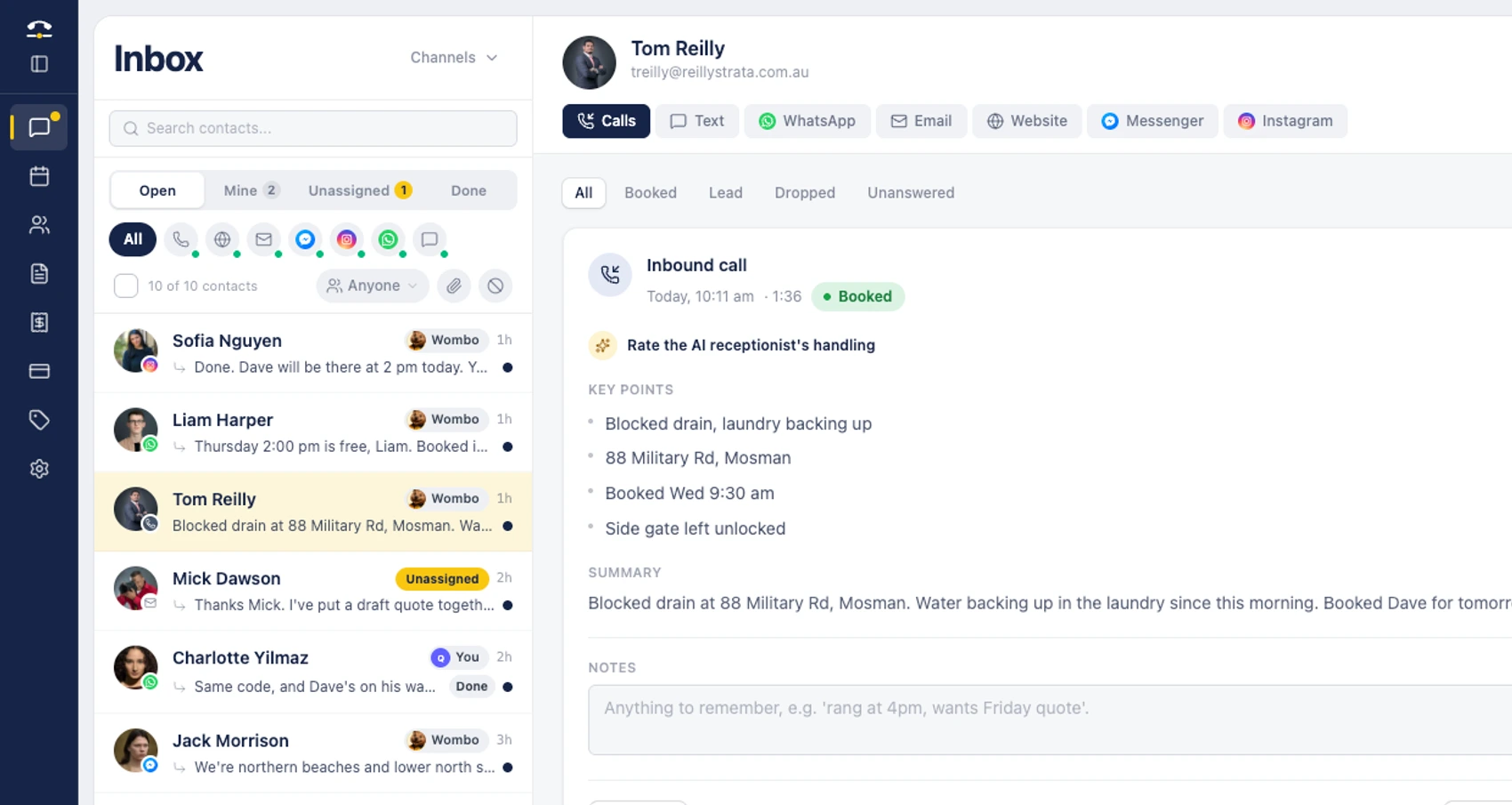
Customers hear back while your hands are full. Website chat, email, WhatsApp, Facebook, Instagram and texts land in one inbox, and on paid plans Wombo, your AI office manager, handles the conversations in your business name. With booking on, he books the job. Anything urgent comes straight to you, and you can step in any time.
One inbox, instead of six apps to check between jobs.
Two-way texts are Australia only for now and run on your AI number. Email replies are drafted for you to send. On Free, you reply yourself; Wombo takes over on paid plans.
See the inbox

AI receptionist
Stop losing jobs to voicemail. When you can't pick up, day or night, your AI receptionist answers on the number your customers already know, in Australian or New Zealand English. It finds out what they need and where, and with booking on, puts the job in your calendar and texts them a confirmation from your plan's texts.
Same number your customers already have. They just get an answer now.
Hear it take a real callNo card, no time limit.
Built for your trade
Pick yours to see how a normal week runs, from the urgent jobs to the repeat work.
-
Electricians
Faults, fit-offs, safety switches
-
Plumbers
Blocked drains, hot water, leaks
-
HVAC & air con
Services, repairs, installs
-
Builders
Repairs, maintenance, small jobs
-
Carpenters
Doors, decks, repairs
-
Painters
Interiors, exteriors, touch-ups
-
Landscapers
Gardens, mowing, landscaping
-
Cleaners
Homes, end of lease, offices
-
Roofers
Leaks, gutter cleans, storm repairs
-
Others
Handymen, pool cleaners, pest control, locksmiths and more
Working a particular city or region? See local pages for your area
Works with the tools you already use
Jobs go to ServiceM8 and your Google or Outlook calendar, invoices sync to Xero for your books, and WhatsApp, Messenger, Instagram and email land in one inbox. Connect them once from your dashboard.
Email also works with Yahoo Mail, iCloud Mail or any IMAP mailbox.
See all integrations




What tradies ask before they sign up.
What does Tradies Line do?
It's the AI operating system and job management software for a trade business: jobs and dispatch, quotes, invoices and payments, customer records and one inbox for every message, in one place, with AI staff doing the admin. Wombo, your AI office manager, does the work across all of it when you type or talk to him. You check and send every quote and invoice. On paid plans, customer chat replies, and the booking texts and reminders you switch on, go out on their own.
Which AI staff come with Tradies Line?
AI office manager (Wombo): does the work across the system when you type or talk to him: finds any job, quote, invoice or customer, drafts quotes and invoices from your price list for you to check and send, and updates jobs, customers and prices. On paid plans, he also answers website chat, WhatsApp, Messenger, Instagram and texts (Australia) in your business name, books jobs when booking is on, drafts email replies and flags anything urgent to you. AI receptionist: answers the calls you can't take on the number your customers already know, day or night, finds out the job and the suburb, books it into your calendar when booking is on and texts the customer a confirmation from your plan's texts. AI quoting: prices and drafts quotes from your own price list for you to send, and with follow-ups on, nudges customers before a quote expires. AI invoicing: drafts invoices with a pay link for you to send, and with reminders on, chases the unpaid ones.
Do I have to use the AI receptionist?
No. Jobs, quotes, invoices, payments, customers and the inbox all work without it, and Free includes no calls at all. Move to a paid plan when you want your phone answered.
Which trades is it built for?
Service work: call-outs, repairs, maintenance and regular visits. Electricians, plumbers, air con and HVAC, builders and carpenters on repairs and small jobs, painters, landscapers, cleaners, roofers, handymen, pool cleaners, pest control and the like. The trades on the site are examples, not a limit. It doesn't do deposits, progress claims or variations yet, so it isn't built for staged building or renovation projects.
How does the AI receptionist handle a call?
Calls you don't pick up forward to it from the number your customers already ring. It answers in Australian English, or New Zealand English for NZ businesses, finds out what the job is and which suburb, and on a paid plan it can give a rough price from your price list if they ask. With booking on, it puts the job in your calendar and texts them a confirmation if you have texts left. Every call is recorded, and the summary lands in your inbox and on the job.
Does it answer at night and on weekends?
Yes. Calls you forward get answered nights, weekends and public holidays, unless the caller hides their number or you've blocked them. On paid plans, Wombo replies to messages around the clock while you have AI credits. Calls come out of your plan's monthly allowance; Free has none at all, just 5 test calls to try it.
What happens when it can't help a caller?
It takes their name, number and what they need, and tells them you'll call them back. If the job is urgent, it texts you while they're still on the line, as long as your business number is verified and you have texts left. It never commits you to a firm price; that stays with you.
Can I change what it says?
Yes. It works from your business name and greeting, your hours, services and prices, the suburbs you cover and your booking rules, like buffers between jobs, minimum notice and how far ahead it can book. You choose its voice, and on a paid plan you can upload your own documents for it to answer from.
Does the customer know it's an AI?
If a caller asks whether they're talking to a person, your AI tells them straight away that it's the AI receptionist for your business. In messages, Wombo says he's your AI assistant if asked. Calls are recorded, and your AI tells the caller so during the call. Our AI disclosure explains it for your customers.
Do I need a new phone number?
No. You keep the number your customers already ring and forward it to Tradies Line when you're busy or don't answer, using your carrier's forwarding codes or phone settings. Turn it off the same way. Your carrier may charge for forwarded minutes; we don't.
Which messages does it answer?
Website chat, WhatsApp, Facebook Messenger, Instagram and email, all in one inbox. On paid plans, calls and two-way texts (Australia) join them, and Wombo replies in your business name, books the job when booking is on, drafts email replies for you to send, and flags anything urgent to you.
Does it work with my calendar and accounting?
On Free and Starter, every job you schedule goes into your Google or Outlook calendar, and the AI checks it before it offers a time. Jobs the AI books go in too once you switch on Sync booked jobs in Settings. On Pro and Enterprise, only the jobs you're rostered on go in. Invoices can sync to Xero, and booked jobs can land in ServiceM8.
Is it for a one-person business or a crew?
Both. Free has one login, Starter five, and Pro and Enterprise unlimited. Add crews with their own calendars, move jobs between them on the day board, and send each person their day's jobs by text or email. Subcontractors don't need a login.
Ready to hand the office over?
Jobs, quotes, invoices and every customer message in one place, with Wombo doing the admin while you're on the tools.
Start freeNo card, no time limit.